 ShackDeck
Download Free Now
ShackDeck
Download Free Now
What's new · 18 October 2026
Version 0.3.5: the ShackDeck cloud, uploads to QRZ and LoTW, ShackDeck Plus
A big release. The log now lives in the ShackDeck cloud too: moving to a new computer with a recovery code, two devices on one log. Contacts go to QRZ Logbook, Club Log, eQSL and LoTW by themselves. ShackDeck Plus arrives: the paid part for those who want to support the project, with developer support right from the program. Plus vintage Yaesu over CAT, an RTL-SDR dongle over USB, a new settings window and small screens.
The ShackDeck cloud. The log is now kept not only on your disk but on shackdeck.com. A copy is written with the "Save now" button in the logbook, next to ADIF import and export; the site keeps the last ten. Every cloud has a 25-character recovery code: the program shows it in the settings, under "ShackDeck cloud". A fresh system, a new computer: install the program, type the code, the log is there. The same code on a second computer joins it to the same cloud: a laptop in the field and a desktop at home keep one log, and contacts from both meet. The site issues the code and it cannot be guessed; whoever knows it sees the log, so write it down somewhere safe.
Uploads to the services. "Services and exchange" now has QRZ Logbook, Club Log, eQSL and LoTW. Each is switched on with a checkbox; contacts go with the "Upload all" button, and with Plus by themselves, seconds after a contact is logged. LoTW goes through ARRL's TQSL with your certificate. QRZ charges for uploads to its logbook on its own side, and the program says so. Contacts made over the online band go nowhere: that is not radio, and they do not belong in anyone's logbook.
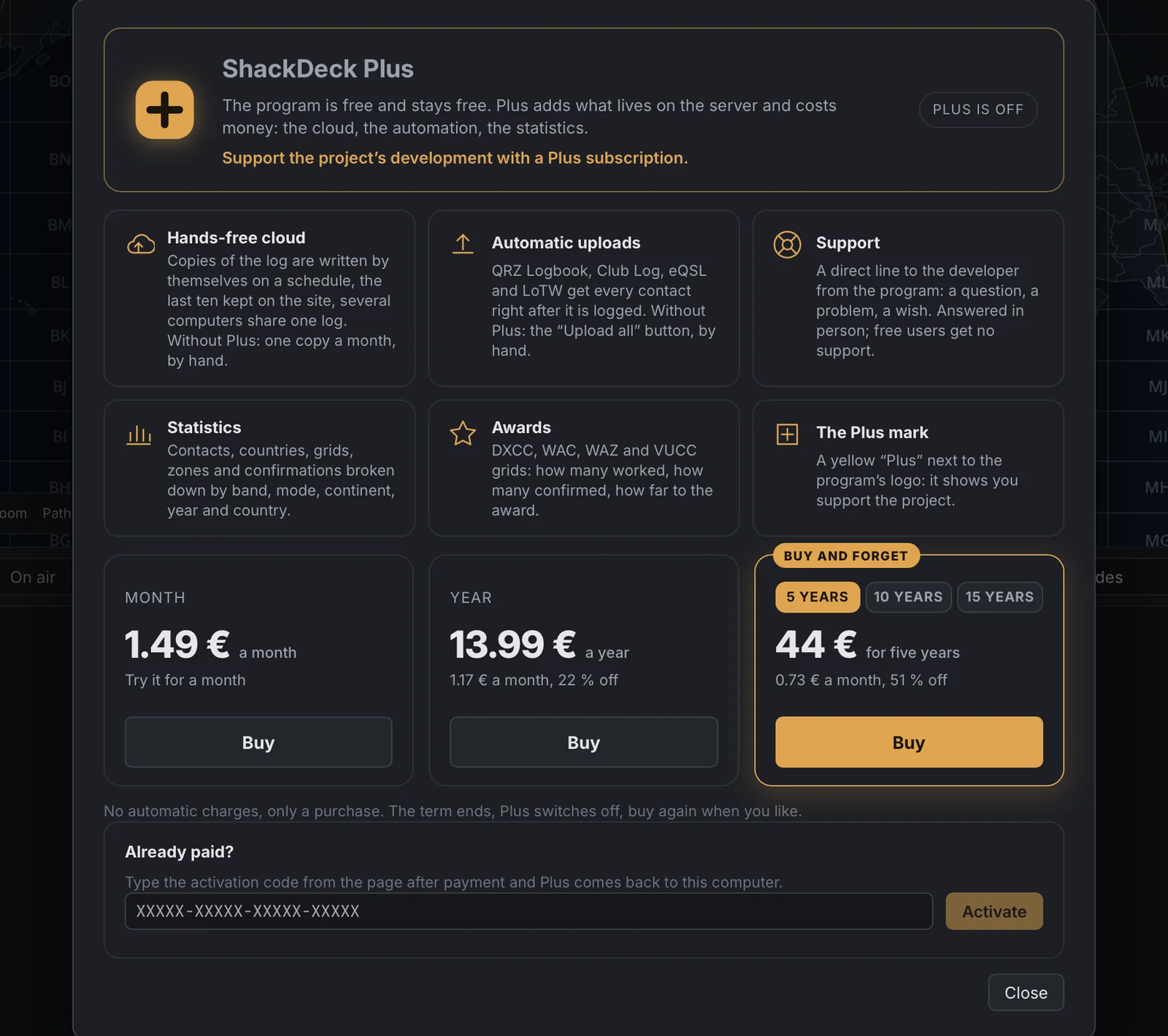
ShackDeck Plus. The program is free and stays free. Plus adds what lives on the server and costs money, and it is the way to support the project's development. What it gives: automatic copies of the log to the cloud on a schedule and the merge from another computer, automatic uploads to QRZ, Club Log, eQSL and LoTW, statistics and awards, support (a direct line to the developer from the program, the answer arrives in the program) and the yellow "Plus" next to the logo. Plans: a month €1.49, a year €13.99, five years €44, ten years €74, fifteen years €108. No automatic charges, only a purchase: the term ends, Plus switches off, buy again when you like. A term bought early is added to the current one. After payment you get an activation code: it brings Plus back after a reinstall or on another computer. The Plus button sits in the program's header; the window with the description and the plans opens from there or from "About".
Your own radio. Vintage Yaesu over CAT: FT-1000MP, FT-920, FT-990, FT-890, FT-747, FT-757, FT-100 and their kin, with their five-byte commands, are recognised by themselves. The Icom, Kenwood and Yaesu protocols were checked against the primary sources, the model tables come from Hamlib, and the settings show your exact model. The "My radio" source got a "CAT / SDR USB" switch: an RTL-SDR dongle plugs in without extra software, and the waterfall and the decoders work with it as with an online receiver.
The settings window is wider: sections on the left with icons, fields on the right. "About" was redone: logo, version, developer, libraries in groups. "General" got an audio output picker: speakers, headphones or an AirPlay amplifier, switched on the fly.
Small screens. The program works in a window from 1100×600 points, which is any laptop alive today, including 1366×768 at 125 % scaling. In a narrow window the mode, band and tuning step are picked from lists, and the bars of the logbook, the map, the DX cluster and the satellites fit in one row, the rest folding into menus.
The program updates itself; new users: the Download page.